
Tax Year 2023 App
The Tax Year 2023 app includes the following features:
- Generate Form 8949 for 2023, 2022, 2021, or 2020 tax year
- Processing of broker Forms 1099-B PDF files
- Support for all 4 Schedule D and Form 8949 reporting options:
- Traditional
- Exception 1
- Exception 2
- Exceptions 1 and 2 Combined
- Convenient email to forward to your Tax Pro with information and links to your forms generated by the app
- "Summary" tax software data import if you have more transactions than can be imported by your tax software
- "Intelligent" Form 8949 statements
- Edit broker data using Google Sheets
Email us with requests for additional program features and improvements.
Broker File Support
Our app supports processing of 5 types of data files from over 100 brokers.
See our broker support page for the matrix of broker and file support.

Are you new to Form8949.com?
Take 2 minutes to see how easily you can generate 2023 IRS Form 8949 for as little as $12.00.
Using the Form8949.com App is as Simple as 1, 2, 3
1. Collect
For each of your broker accounts
Download your broker 1099-B data file
Upload the file to our app
See list of supported brokers and files
2. Perfect
Review the generated app results
If there is any missing or incorrect information
Download the data to Excel or export to Google Sheets
Edit the Excel spreadsheet or Google Sheet
Then upload or import the corrected data into the app
3. Integrate
Integrate the outputs of our app with your tax software
Import the Form 8949 data
Or attach a Form 8949 statement
See "Tax Software Integration" below
Tax Software Integration
For detailed integration information, click on the name in the software column below.
Software
Direct Import

PDF Attach
TXF Import
CSV Import
If your tax software is not listed above,
contact us at support@form8949.com
with information about your tax software.
Do you use a Tax Professional?
Save your tax preparer time and save tax preparation fees

Use our app to process your broker data file and generate schedules of your capital gains and losses in PDF format.

From the app, you can be sent an email to forward to your Tax Pro with information and links to your forms generated by the app.
Are You a Tax Professional?
CPAs and other tax professionals,
Use our app to quickly convert broker 1099-B data files to files importable into tax software.
As a tax professional you can get 50% off our regular processing fees. Learn More
Software
CSV Import
XLS Import
PDF Attach
Direct Import

Do you use TaxAct?
If you use a broker that does not participate in the TaxAct electronic import program, we can help.
- Use our app to process your broker 1099-B data file
- Edit your broker data, as necessary
- Then directly import your data into TaxAct from Form8949.com
See TaxAct Import Steps for TaxAct Import details.
If you are an active trader with more than 2,000 transactions, use our app to generate Form 8949 Statements for attachment to your tax return.
Schedule D and Form 8949 Reporting Options
You have 4 options for reporting your broker transactions. All 4 are acceptable to the IRS. And all 4 are supported by our program. Option 1 is the most straight-forward. Options 2 - 4 can save you paper. You may use the option that works best for you.
1
Report all transactions on IRS Form 8949
2
Use Exception 1. Aggregate qualifying transactions* and report them directly on either line 1a (for short-term transactions) or line 8a (for long-term transactions) of Schedule D. Report only nonqualifying transactions on Form 8949. More...
3
Use Exception 2. Instead of reporting all transactions on Form 8949, report all transactions on an attached statement containing "all the same information as Form 8949 Parts I and II and in a similar format". The statements generated by our app satisfy this requirement and hold 49 transactions per page. While some suggest that you simply attach a copy of your consolidated brokerage statement (1099-B), it is our position that most broker statements do not satisfy the "same information and in a similar format" requirement. More...
4
Use Both Exceptions 1 and 2. This option minimizes the number of pages needed to report your broker transactions.
* For purposes of Exception 1, qualifying transactions are transactions for which all of the following statements are true :
- You received a Form 1099-B (or substitute statement)
- The 1099-B shows that basis WAS reported to the IRS
- Does NOT show an adjustment in box 1f for accrued market discount
- Does NOT show an adjustment in box 1g for wash sale loss disallowed
- The Ordinary box in box 2 is NOT checked
- Is NOT a sale of collectibles
- You are NOT electing to defer income due to an investment in a Qualified Opportunity Fund (QOF) and are NOT terminating deferral from an investment in a QOF

Do you prepare your income tax return by hand?
For many taxpayers with simple returns, money can be saved by preparing Form 1040, Schedule A, and Schedule B by hand.
However, if you have more than a few brokerage transactions, it doesn't make sense to prepare Schedules D and Form 8949 by hand.
For just $12, we can generate these schedules for you
and save you the time and tedium of transcribing broker transaction data.

Do you use TurboTax for Windows or TurboTax for Mac?
The Windows and Mac editions of TurboTax have some advantages over the online edition.
Unlike the online edition:
- You can use the deluxe edition and don't have to upgrade to premier edition just because you have stock trades.
- You can directly view and edit the forms, schedules, and worksheets that are used in your tax return.
Do you use TurboTax for Windows and have more than 1,000 transactions? See this article for more information.
Do you use TurboTax for Mac and have more than 1,000 transactions? See this article for more information.
Do you use TurboTax Online Edition?
Do you use TurboTax Online and have more transactions than can be imported into the program?
See this article for more information.
Form 8949 Statements
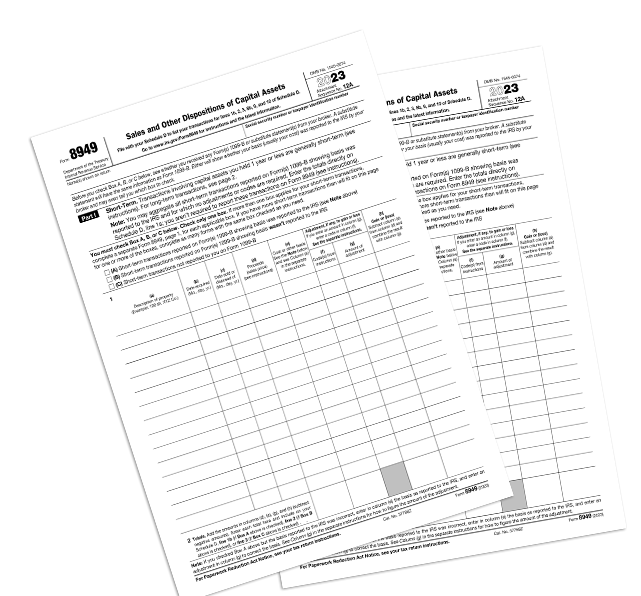
IRS Form 8949 only has room for 14 transactions per page. If you have many hundreds of transactions, this will result in a lot of pages.
Our programs will generate both the official IRS Form 8949 and "Form 8949 Statements". These statements are acceptable to the IRS and hold 49 transactions per page, reducing the number of pages generated.
There is no extra change for this conversion service and you can use whichever edition you prefer for your tax filing.
You may download a sample IRS Form 8949 and a sample Form 8949 Statement to compare the two.
Spreadsheet Conversion
We can convert your spreadsheet of realized gain and loss information to IRS Schedule D, Form 8949, and Form 8949 Statements.
Microsoft Excel
You can upload an Excel spreadsheet file for processing. While the XLSX format is preferred, the older XLS format is also supported.
See the spreadsheet requirements page to download a spreadsheet template file and get more details.
Google Sheets
We also support import from Google Sheets. The app will generate a Google sheet that you can edit. You must sign in to the app with an email that has a related Google account in order to use this feature.

App Overview
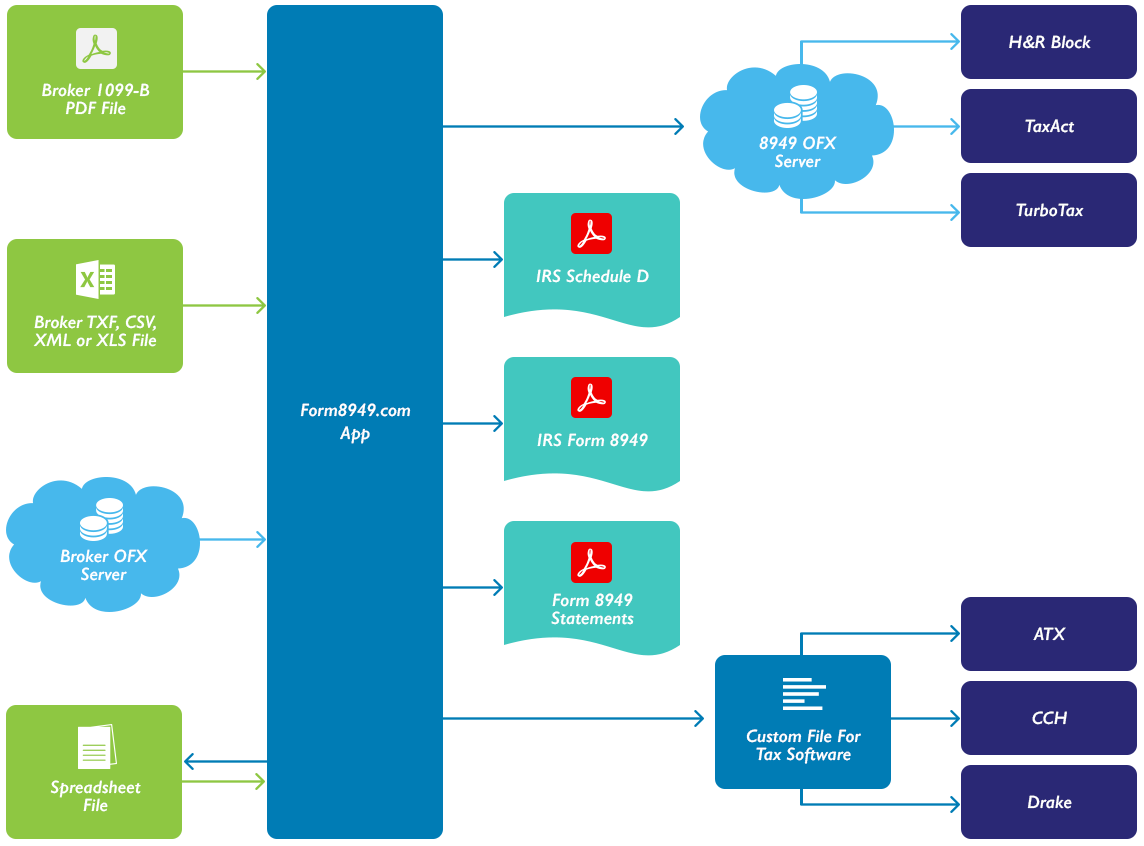
Inputs
1. Our app retrieves data from openly-accessible broker OFX servers.
2. It also processes broker 1099-B data files in XML, JSON, TXF, or CSV files that you download from the broker website.
3. If the above file types are not available, we can process broker 1099-B PDF files that you download from the broker website.
4. We also process spreadsheet files (Microsoft Excel) that you create.
Outputs
5. The app generates IRS Form 1040 Schedule D and
6. Forms 8949 in PDF format for attachment to your tax return.
7. We also generate files you can deliver to your tax preparer for use in professional tax preparation software.
Tax Software Interfaces
8. Your data can also be imported directly into H&R Block, TurboTax, and TaxAct.
For tax year 2023, we will be supporting both the Open Financial Exchange (OFX) and Financial Data Exchange (FDX) standard interfaces.